Kakao mail renewal
A contextual mobile mail experience
for modern identities.

Kakao mail renewal
A contextual mobile mail experience for modern identities.

Overview

The new KakaoMail is a new type of mobile mail platform which expresses me as a person with multiple personas and roles in modern society. As technology and trends changed, the platform and usage behavior of mail also changed. I analyzed the usability of past - current mail and redefined the role of mail. New Kakao mail provides efficient and immersive mail management and consumption experience by reflecting the many aspects of me through a system called '+extension'. It helps users digest and consume mail in the propriate context and role.

Role

Product designer

Product designer

Team

3 Designers

Impact

Purchased by Kakao and applied for a patent

Timeline

2021

*The teaser video is in Korean

Process

Redefine the role of mobile mail.
Researching mail behaviors and surveying hundreds of users.

Background

Email experience evolved from a communication tool
into an information consumption platform.

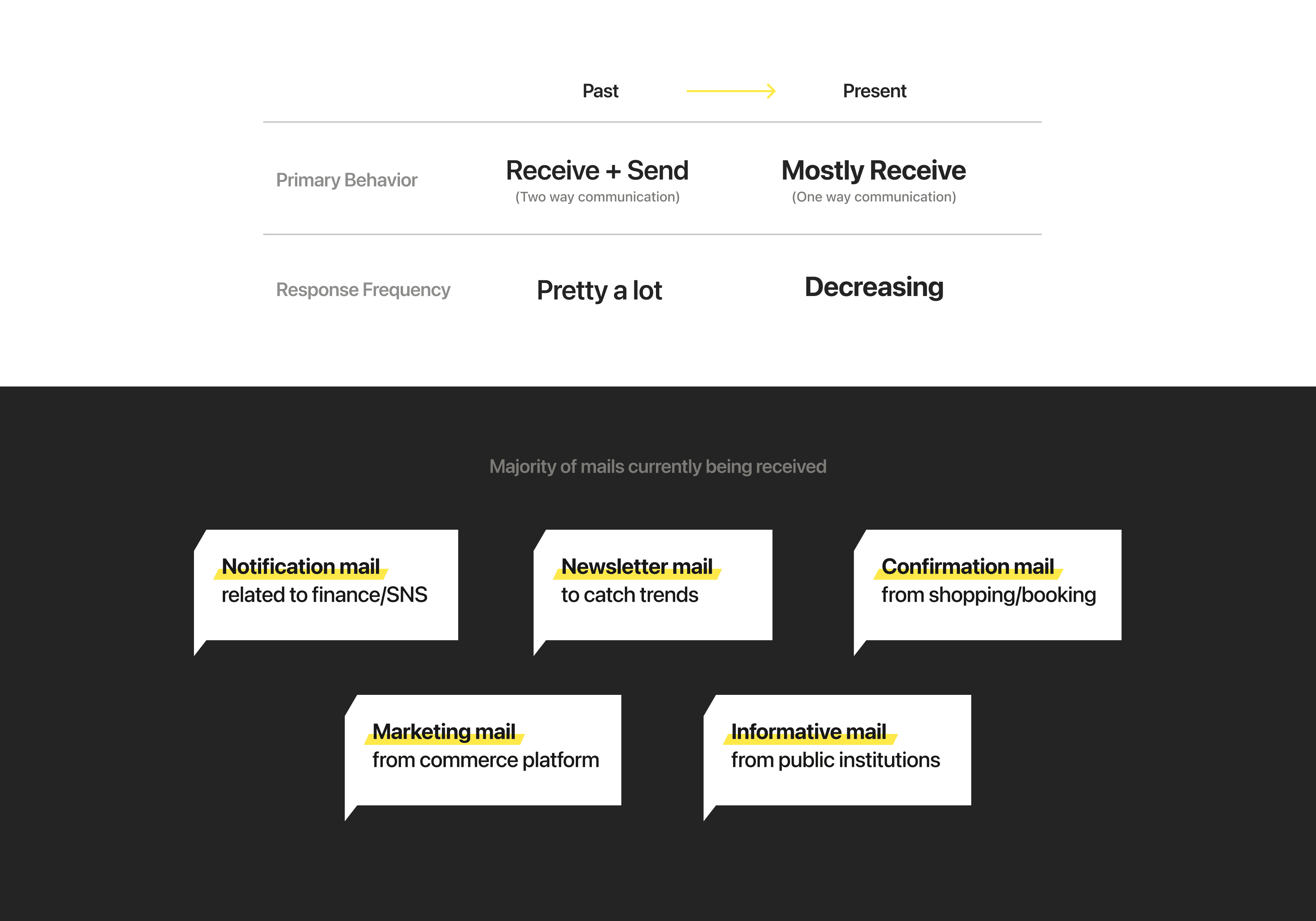
Email is one of the most familiar services, but as technology and trends have evolved, platforms have changed, and usage behaviors have changed. Unlike in the past when email was used to communicate with people, current email is used to receive important information such as certificates, notifications, newsletters, and notices, so the frequency of replies is dramatically reduced compared to the past.

As a result, people are now using email services to consume information rather than communicate. However, the usability of email has remained stuck in the past. It's time to redefine the mail service.
User survey

User survey

Multiple roles and purposes were collapsing into a single overloaded inbox as our social roles accumulate.

Multiple roles and purposes were collapsing into a single overloaded inbox as our social roles accumulate.

We surveyed about 300 users and found that most of them were still using the same email accounts they'd been using for years. Over the years since users began using email, the roles of users have been accumulated and the purposes of the email they receive have varied. As a result, emails for many different purposes are piling up in a single inbox, saturating it and hindering efficient consumption and digestion.

We surveyed about 300 users and found that most of them were still using the same email accounts they'd been using for years.

Over the years since users began using email, the roles of users have been accumulated and the purposes of the email they receive have varied. As a result, emails for many different purposes are piling up in a single inbox, saturating it and hindering efficient consumption and digestion.

Accoring to the survey, 73% of them use multiple email accounts. However, 86% of users who use multiple accounts said these accounts don't function effectively for their purposes. This means the multiple mail accounts they created to manage their mail more efficiently are not effectively helping them consume their mail.

Accoring to the survey, 73% of them use multiple email accounts. However, 86% of users who use multiple accounts said these accounts don't function effectively for their purposes.

This means the multiple mail accounts they created to manage their mail more efficiently are not effectively helping them consume their mail.

Despite this inefficiency in email management, over 80% of users were receiving important information via email, including job applications, offers, government mail, financial information, educational newsletters, contracts, and booking/shopping confirmations. So, we need to improve the mail experience for better mail digestion.

Problem statement

Problem statement

A single inbox could no longer handle
the multiple identities and contexts of modern people.

A single inbox could no longer handle the multiple identities and contexts of modern people.

We have a variety of roles and personas, but all of the mail related to each of them was concentrated in one mailbox, which was preventing efficient mail consumption. In other words, the many mixed purposes of a single inbox were preventing the proper information digestion of mail. So we redefined the current mail services as having a role in 'information digestion'.

We have a variety of roles and personas, but all of the mail related to each of them was concentrated in one mailbox, which was preventing efficient mail consumption.

In other words, the many mixed purposes of a single inbox were preventing the proper information digestion of mail. So we redefined the current mail services as having a role in 'information digestion'.

Product vision

Product vision

Mail with personalized personas and identities.

Mail with personalized personas and identities.

Unlike current mail, people were consuming and managing information more immersively and effectively in an environment that reflected their individual personas and identities.

Product direction

Redesigning mail around directly visualized user personas
instead of email categories.

Redesigning mail around directly visualized user personas instead of email categories.

Redesigning mail around directly visualized user personas instead of email categories.

Therefore, we set the direction of the service based on the results of user research, the insights we gained, and the problems we defined. Whereas previous mail simply categorized emails by type, the new KakaoMail will add layers of user's personas to help users digest their emails.

Therefore, we set the direction of the service based on the results of user research, the insights we gained, and the problems we defined.

Whereas previous mail simply categorized emails by type, the new KakaoMail will add layers of user's personas to help users digest their emails.

Design concept

Design concept

By adding 'extensions', creating separate mail identities
through persona-based extensions.

By adding 'extensions', creating separate mail identities through persona-based extensions.

The new KakaoMail provides some tags, called extensions, that can be added after one's email ID. Users can add up to three accounts with extensions and manage them by switching between them directly in KakaoMail.

The extension makes users feel more immersed in their personas and accounts, and technically, when receiving or sending emails, each email account with an extension functions as a separate email account.

The new KakaoMail offers some tags, called extensions, that can be added after one's email ID. Users can add up to three accounts with extensions and manage them by switching between them directly in KakaoMail.

The extension makes users feel more immersed in their personas and accounts, and technically, when receiving or sending emails, each email account with an extension functions as a separate account.

Design

Design

Extension allows users to create and manage
multiple persona-based email identities.

Extension allows users to create and manage multiple persona-based email identities.

Users have multiple personas and identities. Depending on their persona, they can choose one of the extensions and add it to the end of their email ID. This will create an unique email that reflects their persona. Users can create and manage up to three extensions in their account in this way.

Users have multiple personas and identities. Depending on their persona, they can choose one of the extensions and add it to the end of their email ID.

This will create an unique email that reflects their persona. Users can create and manage up to three extensions in their account in this way.

Design

Design

Add a profile with custom extensions.
Letting users build personalized mail identities.

Add a profile with custom extensions.
Letting users build personalized mail identities.

Add a profile with custom extensions. Letting users build personalized mail identities.

In addition to the first profile users create, users can add a few more profiles with some attractive extensions. Users will be able to immerse themselves in their mail with extensions that showcase who they are.

In addition to the first profile users create, users can add a few more profiles with some attractive extensions.

Users will be able to immerse themselves in their mail with extensions that showcase who they are.

Design

Design

Designing a mobile-first feed view
for much lighter email consumption.

Designing a mobile-first feed view
for much lighter email consumption.

The new Kakao Mail provides a feed mail view that is suitable for mobile experiences.
Users preview useful contents by simply scrolling through the feed mail, and can also switch to the list view.

The new Kakao Mail provides a feed mail view that is suitable for mobile experiences. Users preview useful contents by simply scrolling through the feed mail, and can also switch to the list view.

The new Kakao Mail provides a feed mail view that is suitable for mobile experiences.

Users preview useful contents by simply scrolling through the feed mail, and can also switch to the list view.

Design

Just a single tap mail feedback,
Improve mail experiences and make it more personalized.

After reading the mail, users can quickly and easily do feedback on the mail with a single tap. The accumulated feedbacks are reflected in the user's 'mail management+' to help them digest the mail.

After reading the mail, users can quickly and easily do feedback on the mail with a single tap.

The accumulated feedbacks are reflected in the user's 'mail management+' to help them digest the mail.

Design

Mail management plus(+), smarter mail experience.

With Mail management+, users can organize and manage their mailboxes with simple switches and automatically accumulated user feedback. Users can enter Mail management+ via the "I'm tab".

Manage your mail with a simple switch

Mail management+ allows you to view mail from all senders who have ever sent you mail, and provides sorting by various criteria.

Users can block mail from senders they no longer want to receive by turning off the swtich, which helps filter out unnecessary information in the mailbox and helps users digest their mail.

The more you read, the smarter you get

The mail feedback above is reflected in Mail management plus(+).

If you read an email and leave some negative feedback at the bottom of the mail, the sender of the email will be added to the "Emails that need to be managed" section at the top of Mail management+ to help you manage emails from this sender effectively.

Design

Pick an email account
and send a mail.

After adding an email with some unique extensions to KakaoMail account, KakaoMail will provide you with multiple emails with the extension. When a user needs to use an email address to send a mail or sign up for a newsletter, the user can choose one of the email addresses depending on the situation and purpose.

After adding an email with some unique extensions to KakaoMail account, KakaoMail will provide you with multiple emails with the extension.

When a user needs to use an email address to send a mail or sign up for a newsletter, the user can choose one of the email addresses depending on the situation and purpose.